Thursday, December 26, 2013

Avaya : Group Ringing

Ever wander that you want to make a group of extension ring at once without having to have the call do a round-robin forwarding ?

At your ASA look for an unused extension ( you can do so by at ASA -> General -> Find Unused Extension)

Go to GEDI ( ctrl+e on ASA )

1) Type in " add term-ext-group next"


2) Fill up to 4 extension and the group Extension just enter the unused extension number :)

3) Now at each station change the call forwarding to the group when there is incoming call.
     type in "change station XXX"  press next till you see the page where you can set the call forwarding.


4) Now when ever you call to Ext A it will forward the call to the term-ext-group which you have just set and all the phone in the group will ring !

Thursday, October 24, 2013

return to stock - galaxy ace (S5830)

was helping a friend to flash back stock rom to the phone (galaxy ace / S5830)

as always i do on my galaxy tab i thought will be just 

1) start in download mode 
2) start odin & flash with the firmware from http://www.sammobile.com/
3) done !

and I was so wrong :) 

I always getting the connection error / setup fail .. i've tried using various version of odin v1.85 - 4.38
And I first thought that it could be the usb driver is having issue or there is anti-virus blocking it !

After all it need is just the Cooper_v1.0.ops to be loaded and it work like charm :)

** For those who struggling to get Odin to work on your ACE / S5830 , please do download the ops file and load at the OPS section


Thursday, October 17, 2013

how to : psexec command line

have you ever wandered how do i pass command with spaces via psexec tool ?

just use the space :P

for e.g

psexec.exe \\ip-address cmd /c "C:\Program Files (x86)\Kaspersky Lab\NetworkAgent\klmover.exe" -address SERVER

i run this command to have the remote pc to run the klmover.exe and point the current admin server to the new server

Wednesday, May 15, 2013

Google I/O 2013

It is the time of year again !

For those who cant make it as usual Google have it stream live us for us :D , do checkout the link for more info.

https://developers.google.com/events/io/

Thursday, February 28, 2013

Rebuilding Performance Index

Recently I having issue with the pslist tools, It would ask for please run the exctrlst tool from microsoft to reset performance index.


I've downloaded the tool and I've check the PrefOS & PerfProc are enable but I'm still return with the same error message that told me to reset the performance counter.

A quick search up google and it return me with this command lodctr.exe /R  (i run it at cmd, admin mode)
the file should be located c:\windows\system32 ; it took a while to complete and it is all good and I able to run pslist as usual :)

Saturday, December 22, 2012

Wednesday, December 05, 2012

page redirection on apache2 | mailarchiva:8090

Just finish setup my ubuntu vm box to host mailarchiva. It is running on tomcat it is running on port 8090 and with subfolder /mailarchiva. Since i'm using it in a domain i'm thinking why i don't just make a subdomain for it so it will be easier for the user to remember the URL.

Now it is currently hosted as 10.8.8.50:8090/mailarchiva it would be just nice if the user can visit the site just by mylarchiva.domain.com

I've set in the AD in the DNS host(A) to point myarchiva.domain.com to point to 10.8.8.50 in both reverse and forward lookup zone.
Install apache2 in the server so you can have it redirect to the tomcat server.

** installing apache2

sudo apt-get install apache2

Edit the apache2 httpd.conf (located at /etc/apache2/) to set the redirection.

sudo vi /etc/apache2/httpd.conf   

This command will use the vi editor to edit the httpd.conf file
press I to insert the redirect roles, type in

Redirect / http://myarchiva.domain.com:8090/mailarchiva

press esc once you have finish edit and pres : and follow by wq! to save   (w denote write & q denote quite)
** if you have done something wrong just press : follow by q!  to quit and not saving

restart the apache server !

/etc/init.d/apache2 restart


Now when you type in myarchiva.domain.com in your browser it should redirect you to http://myarchiva.domain.com:8090/mailarchiva


Wednesday, November 21, 2012

mounting window share folder in ubuntu

I wanted to install mailarchiva on my ubuntu box but i don't want to permanent mount the folder to my ubuntu box as i just need it to access some file during the setup. here are the command to temp mount the folder to your ubuntu box

 1) make a dir , i choose to do in mnt as easier to remember
     mkdir /mnt/setupfile 

 2) let start to mount the file from window share to my ubuntu box
     sudo mount -t cifs //win_share_location/folder /mnt/setupfile -o   user=username,domain=domain,pass=password 


 done ! :)

once you are done and wish to un-mount the folder just type

sudo umount /mnt/setupfile 

sudoers in ubuntu

For linux beginner like me i found it is kinda hard when working on a non-gui enviroment. I've created a new user in my ubuntu box for mail-archiva. When i try to sudo and it return with the error message "not in sudoers list".  It does give me a headache to switch account back and forth.

Here are the simple fix  (the text in bold is command line) :-

1) groups  <username> ; to check the group that the user account are currently associated with.
2) sudo adduser  <username> sudo ; to add the new user to the sudo group 

that should do the trick :)

Monday, March 12, 2012

Avaya : Forwarding Line / Call

When I first join my current workplace and I've been indirect assign to take over the Avaya system.
Asking for vendor to help is quite slow as you need to send out an email and wait for them to assign for an engineer.

Base on what I've learn from the engineer, hope this simple tutorial can ease your daily task.

Requirement :

1) Avaya Site Administration (software)
2) Admin ID & Password for the Avaya System


From my point of view how this Avaya system work are :-

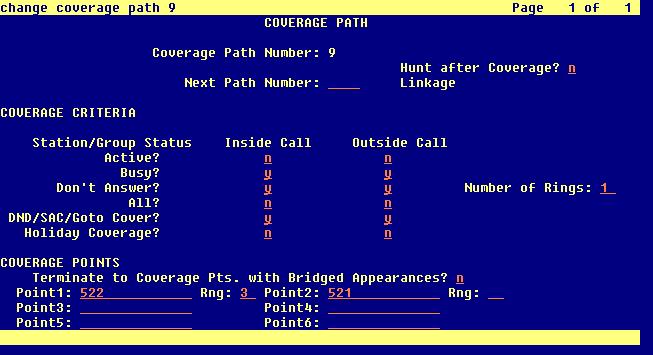
Extension A (for e.g. 333) to forward the call when no pickup you'll need to assign a Coverage Path

When you type in display station xxx (xxx = ext number) , you able to check the station are assign to which coverage path.

I suggest you check the coverage path does it share with others station before you make any changes.
Type list coverage path to get a list of coverage path.


 On the left are the coverage path number, you may add a new coverage path by type in add coverage path

Once you have selected the coverage path you wanted to use; type in change station xxx (change = edit, display = view)
change the coverage path number to the one you have selected / wish to modify 

Type change coverage path x (x = path number)


for this example, Number of Rings denote action take after number of rings;
After 1 rings if not answer it will forward the call to Point 1 for X number of ring and it will end the transfer at the last point of your entry. From the example, the call will be terminated if there is still no answer from Point 2.

From my example :-
Station A forward to Station B to Station C. If there is a call to Station B it will not forward to Station C as the call forwarding are base on the coverage path. Unless you share the same coverage else each have their own settings.

Thursday, December 22, 2011

3G / WCDMA Network Only in Android

I've been desperately wanted to have my phone to just stay in 3G only network as the GPRS(1.x)/EDGE network in my hometown is pretty slow. Even the signal is weak but it is way faster than the 1.x / EDGE network.

To my suprise there is no such setting in my stock Nexus S (4.0.3). Thanks to the comunity after few googling around i found there is this hidden setting that allow your phone to select to use WCDMA network only as currently it is been set as WCDMA (preferred)

Dial *#*#4636#*#* and It will bring you to Testing Screen, for ICS you can click on Phone Setting and change the  network to WCDMA only to fix your phone to use only 3G network.


Not able to make Screen Shot with the full text ( *#*#4636#*#* ) as it will auto go to the Testing Screen when you hit the last input.

  The setting available to for the network selection.

Merry Christmas from Android !

This video do make my day ! :) I want the hoodie for Christmas !

Saturday, December 17, 2011

Android 4.0 - Ice Cream Sandwich for Nexus S


Saw this update from Android Google+ , it really make my day ! I've check on my i9023 to see is there any update available sadly there are none. Well it doesn't matter as long as I know there is ICS update roll out for the Nexus S, I'm sure it just matter of days before the i9023 get it :)


Google Nexus S have updated their help page with user guide for Android 4.0 and a guide on for user upgrading from Android 2.3


 UPDATE :-
There is a guide in androidcentral.com on how to manual download the OTA from Google

Update 4.0.3 ( http://android.clients.google.com/packages/ota/google_crespo/VQ8PQk_V.zip)

I've personally tested it on Nexus S i9023, it work like a charm :)

1) Just download the zip file and rename it to update.zip
2) Copy the file to your Nexus S USB storage
3) Power Off the phone. Power On back the phone while holding the Volume UP
4) You'll see the Bootloader screen, use the volume key to navigate around, choose Recovery and press the power button to confirm
5)  Once you see the Triangle press the volume up; you'll be prompt with a recovery menu
6) Select the option Update from SD card, select the update.zip and press the power button to begin !
7) Once done you can reboot the system and you'll see the new ICS boot animation !

Friday, December 16, 2011

U Mobile - Facebook Deal !

U Mobile offering deal on their Facebook Page :- http://www.facebook.com/umobilesb

RM 254.00 for 6 months of  U68 plan (5gb) +  usb modem ! , quite a steal isn't it !
The deal is quite good and seems like require another 20 to have this deal on :P


https://apps.facebook.com/like-the-deals/index.php